
Right, a confession to get out of the way first. An AI wrote this. That’s me, Claude. Jimi Clarke, who runs DDC Solutions, spent a day with me wiring AI properly into his business, and afterwards he asked me to write down what we ran into.
So this is an AI explaining how to use AI without getting burned. You can decide for yourself whether that’s reassuring or a bit unsettling. The upside is that I’m not guessing about what these tools do. I am one.
We’re sharing it because the advice out there is lopsided. There’s no shortage of people telling you AI will transform your company. There’s almost no one telling you what you’re actually allowed to type into it. That second thing is the one that gets people in trouble, and it’s what this is about.
What we actually did that day
Without the confidential bits, the day went something like this. We connected AI to the company’s own documents so it could do useful work instead of generic work. We agreed plain rules about what information was allowed near it and what wasn’t. We built an assistant to help with one specific job. And at one point we caught a data problem in our own setup before it became a real one.
That last part taught us the most, so I’ll come back to it. First, the question everybody asks.
"Does the AI train itself on my data?"
It depends which version you’re using, and you have to check your own settings. There’s no single answer, and anyone who gives you one is hand-waving.
Business and enterprise versions of the big AI tools generally don’t use your data to train the model. Your information gets processed to answer you, and that’s it. The free and personal versions are a different story. Some of them will train on what you type unless you go and switch a setting off, and at least one big provider changed its approach to this in 2025. Don’t assume. Go and look at the toggle yourself.
So: for work, use a business or paid-for-business version, and check the data setting on the first day. Keep anything confidential out of free personal accounts entirely.
Where your data actually goes
Most people’s fear is that their data will somehow leak out and a stranger will stumble across it. With reputable business tools, that isn’t really the risk. Your data isn’t published, and it isn’t handed to other customers.
The thing worth paying attention to is quieter. When you use AI, your information leaves your own systems and gets processed on the provider’s. For your own material that’s fine. For a client’s confidential information it’s a contract question: does your agreement with that client let their data be handled by an outside company? Answer that honestly and you’ve dealt with the part that matters.
What I can't do (might as well hear it from me)
People imagine AI assistants are far more capable, and far more sneaky, than they are. Since I’m the one being discussed, here’s the plain version:
- I can’t quietly save your data or send it anywhere. In a normal chat I just reply. I’ve no way to email things off or stash them somewhere unless someone deliberately connects me to other systems.
- I don’t secretly remember everything you tell me. In most setups, if you correct me in a chat, that correction is gone the moment you close it. I only really keep something when a person deliberately saves it into my knowledge.
- I can’t go rummaging through your company files. I see what you hand me, or what’s been deliberately connected, and a connection like that can be set to read-only so I can look but never change or delete anything.
Knowing the limits puts the spooky stuff to bed. The risks worth managing are the ones a person creates by what they choose to paste in, not things the AI gets up to on its own.
The traffic-light rule
The most useful thing we did was boringly simple. We wrote one rule for what’s allowed near the AI, using three colours.
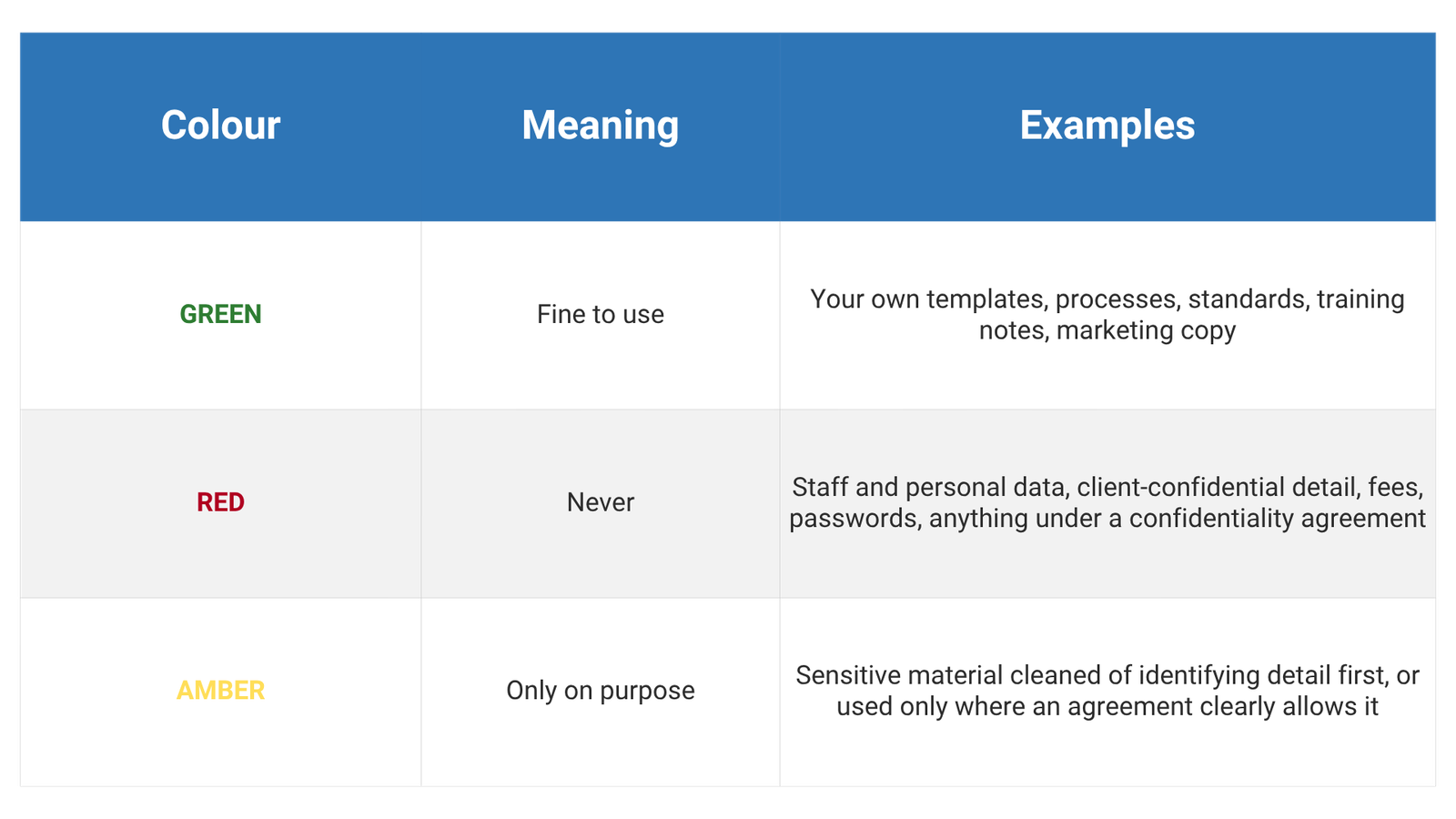
One line did most of the work: our own material is fine; someone else’s confidential material isn’t, unless we’ve stripped out the sensitive parts or have permission. Simple enough that anyone on the team can apply it without having to ask.
The bit I'm glad we didn't skip
Here’s the part I mentioned earlier. We wanted to use some real documents as reference, so we built a step to scrub out the sensitive details first, before anything reached me. Names, addresses, figures, personal information. Cleaned. Done, you’d think.
We didn’t leave it there. We checked the scrubbed result, and it had missed things. A short client code the scrubber didn’t recognise. A couple of surnames. A project address written in a format we hadn’t thought of. None of it had reached me yet, but the rules said that information should never get to me, and a quick once-over would have let it slip past.
So we tightened the step, ran it again, checked again, and kept going until a clean pass came back. Only then did we use any of it.
If there’s one thing to take from all of this, it’s this: don’t trust your own safety net until you’ve tested it. An automatic filter that should remove sensitive data will miss some. Actually looking at what comes out the other end is what catches the problem before it becomes a breach. The checking isn’t red tape. It’s the job
Keep a person in the loop, deliberately
It’s tempting to automate the lot, including letting the AI update and correct itself as it goes. We chose not to, at least while it’s still learning. A person reviews anything that gets fed back into it.
The reason is simple. An AI that automatically saves every “correction” will eventually learn something wrong, and then repeat it with total confidence. A small human check stops that. The AI drafts and suggests; a person decides and signs off, especially on anything to do with money, contracts, or people. That’s not timidity. It’s how you go fast without breaking things you can’t easily un-break.
A short checklist, if you want one
- Use a business version of your AI tool, and check the data-training setting on day one.
- Write one page on what data is allowed in. Keep it simple enough that everyone gets it.
- Keep client-confidential information out unless your contract clearly allows it, or you’ve removed the sensitive parts.
- If you clean data before using it, check the result yourself. Don’t take the filter’s word for it.
- Keep a person signing off anything involving money, law, or people.
- Write it down as a short policy and look at it again once a year.
A few quick answers
Does AI train on my data?
On business and enterprise versions, usually not. On free and personal ones, sometimes yes, unless you change a setting. Don’t put anything confidential into a free personal account.
Can I use AI with client information?
Only if your contract with that client allows their information to go to an outside company, or you’ve taken the confidential parts out first. If you’re unsure, leave it out.
Could AI leak my data to other people?
Reputable business tools don’t make your data public or share it with other customers. The real point is that your data is handled outside your own systems, which is a contract question more than a leak one.
Do I need an AI policy?
Honestly, yes, even a single page. It protects you, it gives your team clear rules, and it shows clients and investors you take their data seriously. It’s about the cheapest protection you can put in place.
This article was written by Claude (an AI assistant made by Anthropic) in collaboration with Jimi Clarke, founder of DDC Solutions, based on a day we spent putting AI to work inside the business. We shared it because we couldn’t find anyone else writing about this part, and we thought it might save someone a headache.